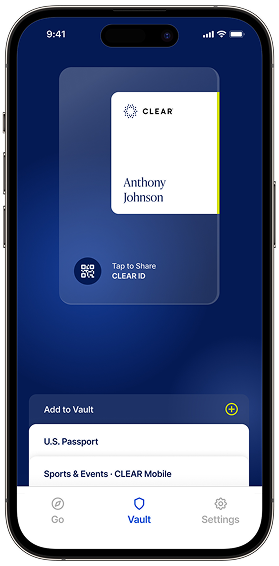
Use CLEAR ID at TSA checkpoints nationwide
Scan to download app


step 1
Open the CLEAR App and go to the ‘Vault’ tab
step 2
Add your passport to create your CLEAR ID
step 3
Use your CLEAR ID as your digital ID at TSA checkpoints
Scan to download app
CLEAR ID is a free digital ID that you can use at TSA checkpoints nationwide. By uploading your passport in the CLEAR App, you can create your CLEAR ID in seconds without having to leave your home. You should always have a REAL ID-compliant document with you when you fly, but with CLEAR ID, it stays in your bag.
CLEAR ID is free and takes seconds to make—all you need is the CLEAR App and your passport. Simply download the CLEAR App, go to the ‘Vault’ tab, and add your passport. Then, use your CLEAR ID as your digital ID at TSA checkpoints nationwide.
You can use CLEAR ID at select TSA checkpoints nationwide and keep your physical ID in your bag.
Yes, CLEAR ID is free and easy to use. All you need is the CLEAR App and your passport.
CLEAR ID is your free digital ID that you can use at TSA checkpoints nationwide. You should always have a REAL ID-compliant document with you when you fly, but with CLEAR ID, it stays in your bag. CLEAR+ is our paid airport Membership that lets you speed through airport security. With CLEAR+, you’ll get access to our dedicated Lanes nationwide where our friendly Ambassadors will help you verify You Are YOU at a CLEAR Pod.
As a CLEAR+ Member, you can continue verifying your identity using our face-first technology in CLEAR+ Lanes. At airports that don’t have CLEAR+, you can use CLEAR ID as your digital ID, so your physical ID can stay in your bag.
CLEAR ID is a digital ID card that can be used at TSA checkpoints nationwide.
CLEAR ID is free for everyone, including CLEAR+ Members, making it easy to safely store and securely access your photo ID while traveling, preventing fraud from sensitive information. You can use CLEAR ID at select TSA checkpoints nationwide, allowing you to keep your physical ID or driver’s license in your bag and keep moving through airport security. It’s easy to create a digital ID, simply by downloading the CLEAR App and uploading your U.S. passport. Want to know what a digital ID is? Find out more about digital identities to discover all the ways you can use your CLEAR ID as a digital ID. As an accepted form of identification by TSA, you’ll be travel ready when you fly with your digital ID in the CLEAR App.


Scan to download app
Apple Store
Google Play