
We're Here to Help

Search Help Articles

Thank you! Your submission has been received!
Oops! Something went wrong while submitting the form.

Will eGates make the CLEAR+ experience faster?

CLEAR+ Membership
This is some text inside of a div block.

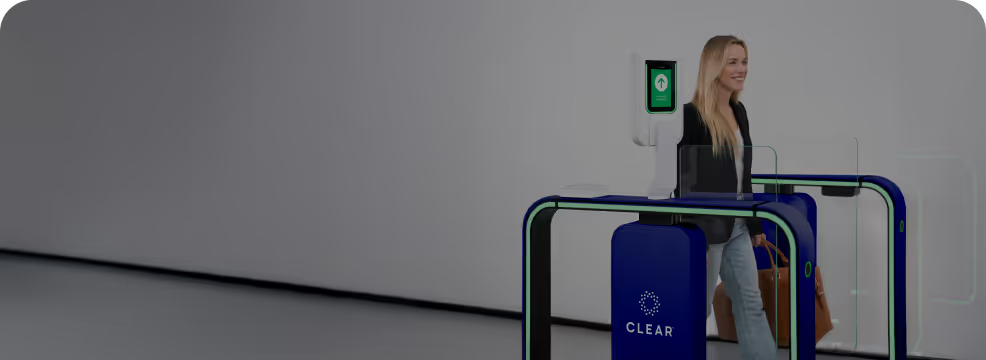
Yes! CLEAR+ Members can now verify even faster with our new eGates.

Which international passports are accepted for CLEAR+ enrollment?

CLEAR+ Membership
This is some text inside of a div block.

You can enroll in CLEAR+ with a passport from:

  • The United States
  • Andorra
  • Australia
  • Austria
  • Belgium
  • Brunei
  • Canada
  • Chile
  • Croatia
  • Czech Republic
  • Denmark
  • Estonia
  • Finland
  • France
  • Germany
  • Greece
  • Hungary
  • Iceland
  • Ireland
  • Italy
  • Japan
  • Latvia
  • Liechtenstein
  • Lithuania
  • Luxembourg
  • Malta
  • Monaco
  • Netherlands
  • New Zealand
  • Norway
  • Poland
  • Portugal
  • San Marino
  • Singapore
  • Slovakia
  • Slovenia
  • South Korea
  • Spain
  • Sweden
  • Switzerland
  • Taiwan
  • The United Kingdom

What are the special rates for Atmos Rewards members?

Partners
This is some text inside of a div block.

All Atmos Rewards members can enroll in CLEAR+ at a discounted rate of $199/yr. 

Atmos status holders receive 1,500 miles for enrolling in CLEAR+ for the first time at the $199 rate, and 1,250 miles for renewing/reinstating their CLEAR+ accounts at the $199 rate.

What if I enrolled in CLEAR+ on HawaiianMiles pricing?

Partners
This is some text inside of a div block.

If you enrolled in CLEAR+ on HawaiianMiles pricing, your pricing will continue to be honored for the remainder of your 2025 billing cycle. If you experience any issues you may contact our Member Care team via chat.

Why did my CLEAR verification fail?

Verify with CLEAR
This is some text inside of a div block.

Your verification with CLEAR may fail for one or more of the reasons below:

  • The phone number you entered is a landline or VoIP number
  • You entered a work phone or email instead of a personal phone or email
  • You are not the owner of the mobile device you are using to verify
  • You are verifying with CLEAR from an unsupported region
  • Your selfie or document image is obscured, unclear, or poorly lit
  • Your government ID is expired, unreadable, or not accepted for verification with CLEAR
  • You exceeded the number of verification attempts
  • Your information did not match trusted sources

You may still see a “Thank you for using CLEAR” message at the end of the process, even if your verification fails. This message does not indicate that your verification was successful.

I didn't receive a text message or one-time passcode (OTP). What should I do?

Verify with CLEAR
This is some text inside of a div block.

If you did not receive a text message or one-time passcode (OTP), make sure you:

  • Are in an area with good cellular or Wi-Fi coverage
  • Use a mobile number (not a landline or VoIP number) that can receive SMS messages
  • Haven't blocked short code 22395, which CLEAR uses for sending passcodes

If you still haven't received your one-time passcode, close the CLEAR verification window, restart the verification process, and try again.

I'm getting an “Unable to process verification” or “Too many OTP attempts” message. What should I do?

Verify with CLEAR
This is some text inside of a div block.

If you're getting an “Unable to process verification” or “Too many OTP attempts” message, this can be because:

  • You entered the wrong OTP
  • Your phone number is unsupported or blocked by the OTP provider
  • You've requested too many codes in a short period of time

Try any of the following:

  • Wait a few minutes, restart the verification process, and try again
  • Make sure the verifying phone number is one you have access to
  • Do not use a landline or VoIP phone number

CLEAR can’t access my camera to take a selfie. How do I fix this?

Verify with CLEAR
This is some text inside of a div block.

You must give CLEAR access to the camera on your mobile device to complete your selfie.

To give access, follow these steps:

  • When prompted, select “Allow” to grant camera access in your browser
  • If you accidentally denied access, open your browser settings and enable camera permissions
  • Try restarting the session or your phone
  • Make sure you're using a supported browser, such as Chrome, Safari, or Edge

Why won’t CLEAR accept my selfie?

Verify with CLEAR
This is some text inside of a div block.

CLEAR matches your selfie with your government ID photo. A failed selfie can happen when:

  • Your face is not centered or too far from the camera
  • The image is too dark, backlit, or blurry
  • You're wearing glasses or a hat
  • Your hair is covering your face
  • The selfie background is busy or too bright
  • The camera lens is dirty or smudged

Here are some tips for a successful selfie:

  • Stand against a well-lit, neutral background
  • Hold your phone at eye level
  • Remove hats or glasses (unless they appear on your ID)
  • Make sure your camera lens is clean
  • Stay still while taking your selfie

If you receive a “Too many selfie attempts” message, close your browser window and restart by clicking the verification link again.

What does “We couldn't match your ID portrait and selfie photo” mean?

This is some text inside of a div block.

This error means CLEAR couldn’t confidently match your selfie to your government ID.

Try the following:

  • Take your selfie again in better lighting
  • Make sure your face is visible and unobstructed
  • Ensure your ID photo is clear. If it’s old, faded, or damaged, use another government ID

Why won’t CLEAR accept my government ID photo?

This is some text inside of a div block.

This usually happens when the photo of your ID is blurry, cropped incorrectly, there's a glare, or the ID type is not accepted. Some partners also do not allow expired IDs. Follow these steps:

  • Use a flat, dark surface behind your ID when taking the photo
  • Avoid direct sunlight or reflections
  • Hold your phone steady and make sure the entire ID fits in the frame
  • Make sure the ID is valid and not expired

If your ID is not able to be captured, consider using a different ID.

What types of documents are accepted to verify with CLEAR?

This is some text inside of a div block.

CLEAR supports government-issued photo IDs from most countries, including:

  • Passports
  • Driver’s licenses
  • National identity cards
  • Residence permits (for foreign nationals or visa holders)

To be accepted for verification, your ID must:

  • Be valid and not expired
  • Have the name and photo clearly visible
  • Be officially issued by a recognized government authority

CLEAR supports IDs from over 190 countries and territories, including the U.S., Canada, Mexico, the U.K., and the European Union, as well as many regions in Asia, South America, Africa, and Oceania.

If your document type isn’t accepted or fails repeatedly, try using a passport, which has the highest success rate globally.

What does “No document detected” mean?

Verify with CLEAR
This is some text inside of a div block.

This message appears when the camera couldn't detect a government ID in your photo.

Try again by:

  • Placing your ID on a solid, dark surface
  • Ensuring the ID is fully visible in the frame
  • Avoiding glare or reflections
  • Holding your phone steady

I'm stuck on a loading or frozen screen. What should I do?

Verify with CLEAR
This is some text inside of a div block.

If you're stuck on a loading or frozen screen when verifying with CLEAR, try the following:

  • Close the browser tab and clear your cache
  • Reopen the verification link and try again
  • Try a different browser, such as Chrome, Safari, or Edge

My phone or browser is out of date. Can I still complete my verification?

Verify with CLEAR
This is some text inside of a div block.

Verifying with CLEAR requires a modern smartphone with a working front-facing camera and updated software. Any of the following will work:

  • iPhone: iOS 18.4 or higher
  • Android: Android 15 or higher
  • Browsers: Chrome 135+, Safari 18.4+, or Edge 134+

If your phone is unable to update to these versions, contact the partner’s support team for alternative verification options.

Should I use my work or personal phone/email when verifying with CLEAR?

Verify with CLEAR
This is some text inside of a div block.

Always use your personal phone number and personal email address when verifying with CLEAR. Using a work phone or work email may result in a failed verification.

I received an error that says, “An account was found but does not match your information.” What does this mean?

Verify with CLEAR
This is some text inside of a div block.

This message means that you have an existing CLEAR account, but it is associated with a different phone number or email address. This can happen because:

  • You used a different phone number or email address when you previously enrolled in or verified with CLEAR
  • You recently changed your phone number, and it’s still linked to an older CLEAR account

Here's how to fix it:

  • Make sure you entered the same phone number and email address you originally used with CLEAR
  • Reach out to CLEAR Member Care by calling 855-CLEARME to update your phone number or email address, or to request an account reset

I received an error that says, “This document is associated with another account” What does this mean?

Verify with CLEAR
This is some text inside of a div block.

This message can mean:

  • The document you scanned has already been used for a verification associated with a different phone number or email address
  • You previously enrolled in or verified with CLEAR, but entered a different phone number or email address

You can fix this by scanning a different document during verification or reaching out to CLEAR Member Care to resolve the issue.

How do I contact CLEAR for help verifying my identity?

CLEAR1
This is some text inside of a div block.

If you're using CLEAR to verify your identity, our support team is here to help. 

The fastest way to get help is through Halo, our Digital Ambassador, available 24/7. Halo can answer questions instantly and connect you with a live support agent if needed.

To get started, click the “Chat with us” button in the bottom right corner of your screen.

Other ways to contact CLEAR:

If you prefer to reach us directly, you can also contact our Member Care team:

How do I enroll in TSA PreCheck® through CLEAR?

TSA PreCheck® through CLEAR
This is some text inside of a div block.

TSA PreCheck® enrollment provided by CLEAR makes it easy to sign up for the TSA PreCheck® Application Program. Get started online by selecting your plan and following instructions. Complete your enrollment at the nearest participating CLEAR location. No appointment necessary!

What is REAL ID?

CLEAR+ Membership
This is some text inside of a div block.

A REAL ID is a federally compliant form of identification that’s required for domestic flights starting on May 7, 2025.

What is My Health Record NY?

This is some text inside of a div block.

My Health Record NY is a secure online service for anyone who has received care in New York State. You can find your information in My Health Record NY if your provider shares data with Healthix (the New York City/Long Island Health Information Exchange) or Hixny (the HEI serving the greater Capital Region).

What is the EnVe Pod?

CLEAR+ Membership
This is some text inside of a div block.

Our new EnVe Pods verify your face, instead of your eyes or fingers, for an even faster verification. We will be introducing our EnVe Pods across our nationwide network through 2025.

Do I need a REAL ID?

CLEAR+ Membership
This is some text inside of a div block.

Every air traveler 18 years and older will need a REAL ID-compliant driver’s license, Enhanced Driver’s License, or another acceptable form of ID to fly within the U.S. Starting February 1, 2026, travelers without an acceptable REAL ID will be required to use TSA ConfirmID and pay $45 before entering the security line. Learn more at tsa.gov/tsaconfirm-id

Is My Health Record NY free?

This is some text inside of a div block.

Yes, My Health Record NY is a free service provided by Healthix and Hixny.

0 Results

Try a new search with different keywords.

Showing
10
FAQ results
This is some text inside of a div block.

Read More

July 22, 2025

What Is an Airport Concierge Service?

July 7, 2025

The Busiest Travel Days of the Year & How CLEAR Makes Them Stress-Free

March 25, 2025

How to Get Through Airport Security Faster